Ecommerce Lifecycle Email Marketing: Stages, Strategies and Examples


Lifecycle email marketing sends each customer the email that fits where they are with your store. A new subscriber gets a welcome, a first-time buyer gets help with the product, and a lapsed customer gets a reason to come back. This guide covers the six stages of the ecommerce customer lifecycle, example emails for each stage and what to measure.
What Is Lifecycle Email Marketing?
Lifecycle email marketing is email sent by customer stage instead of by calendar date. Each email goes to a customer because of what they did, or stopped doing: they signed up, bought for the first time, or have not ordered in a while. Lifecycle marketing is the wider plan, which adds SMS and other channels to the email.
Three lifecycle emails show the idea:
- A new subscriber gets a welcome email with your story and your bestsellers.
- A first-time buyer gets tips on using the product, then an offer on the next order.
- A loyal customer gets VIP early access to a sale.
Lifecycle emails and campaigns work together. A campaign goes to many people on one date. A lifecycle email, usually part of an automated flow (a series of emails that sends on its own), goes to one customer when they reach a stage.
Key Benefits of Customer Lifecycle Email Marketing for Ecommerce
Customer lifecycle email marketing helps an ecommerce store sell more to the customers it already has. Four benefits matter most:
- More repeat purchases. Each stage has a flow that asks for the next order when it makes sense, such as when a product is about to run out.
- A higher average order value (AOV). Post-purchase and VIP emails suggest products that go with what the customer already bought.
- Emails people open. An email that matches what a customer just did is more relevant than a general newsletter.
- Loyal customers who refer others. Loyalty and referral emails give your best customers a reason to come back and tell friends.
The Six Stages of the Ecommerce Customer Lifecycle
The ecommerce customer lifecycle has six stages: first visit and welcome, first purchase, post-purchase, repeat purchase, VIP and loyalty, and win-back. Each stage has one goal and its own emails. The table shows who is in each stage and which emails and texts serve it.
| Stage | Who is in it | Goal | Lifecycle emails | Where SMS fits |
|---|---|---|---|---|
| 1. First visit and welcome | New subscribers who have not bought | The first order | Welcome series, browse reminders | A welcome text for SMS subscribers |
| 2. First purchase | Shoppers with a cart or a first order | A finished checkout | Abandoned cart and checkout emails, order confirmation | A cart reminder, where the subscriber's SMS consent allows it |
| 3. Post-purchase | First-time buyers after delivery | A product that gets used and reviewed | How-to and care tips, review request, cross-sell | Usually none |
| 4. Repeat purchase | One-time buyers | The second order | Replenishment reminder, second-order offer | A reorder reminder for products that run out |
| 5. VIP and loyalty | Repeat buyers and loyalty members | More orders and referrals | Loyalty points reminder, VIP early access, referral invite | An early-access alert |
| 6. Win-back and sunset | Customers past their usual gap between orders | A return, or a clean list | Win-back series, then a sunset email | One last offer, at most |
Many guides use a five-stage funnel instead: awareness, consideration, conversion, retention and advocacy. The six stages above follow the same journey. They split it at the points where a store's emails change, such as the gap between the first and the second order.
Our lifecycle marketing services plan email and SMS for all six stages in Klaviyo or Omnisend.
Customer Lifecycle Email Marketing Strategies by Stage
The strategy at each stage is to send the email that moves a customer on to the next stage. Each stage below gives the trigger that starts the emails, what to send and how to tell if it works.
Stage 1: First Visit and Welcome
The welcome stage turns a new subscriber into a first-time buyer. The trigger is the sign-up, so the first email goes out right away, while the store is fresh in the subscriber's mind.
- Send a welcome series that tells your story, shows your bestsellers and repeats the sign-up offer.
- Add a browse reminder for subscribers who view a product and leave without adding it to the cart.
- Judge the stage by first orders from new subscribers, not by opens.
Our guide to the welcome email series covers the emails one by one.
Stage 2: First Purchase
The first purchase stage gets a shopper from a full cart to a finished order. The trigger is a cart or checkout left without an order.
- Send an abandoned cart email that shows the products left behind, with reviews and your shipping and returns terms.
- Answer the doubts that stop a first order: delivery time, returns and payment options.
- Send an order confirmation that says what happens next and when the order should arrive.
Our guide to cart abandonment strategies has more ideas for this stage.
Stage 3: Post-Purchase
The post-purchase stage makes sure the product gets used, liked and reviewed. The trigger is the order, and the timing follows the delivery date.
- Send how-to and care tips when the product arrives.
- Ask for a review once the customer has had time to use the product.
- Suggest products that go with the order, not your general bestsellers.
Our guide to post-purchase email campaigns gives examples for each email.
Stage 4: Repeat Purchase
The repeat purchase stage wins the second order. The trigger is time since the first order, set by how long the product lasts or how often customers usually come back.
- For products that run out, send a replenishment reminder shortly before the product is likely to be used up. If a bottle lasts about 30 days, remind the customer a few days before day 30.
- For other products, send a second-order offer or a guide to products that go with the first one.
- Judge the stage by second orders and by the repeat purchase rate, the share of customers who buy more than once.
Stage 5: VIP and Loyalty
The VIP and loyalty stage keeps your best customers buying and gets them to refer friends. The trigger is a number of orders, a spend level or a loyalty points balance.
- Remind loyalty members of their points balance and how close they are to the next reward.
- Give VIP customers early access to sales and offers that are not on the website.
- Invite them to a referral program. Our guide to referral program incentives compares the rewards.
Our guide to ecommerce loyalty programs covers the program side.
Stage 6: Win-Back and Sunset
The win-back stage brings back customers who have stopped buying, and the sunset step stops mailing the ones who do not respond. The trigger is a customer passing their usual gap between orders, or months with no opens.
- Send a short win-back series: what is new, a reason to return, then a last offer.
- If there is still no reply, send a sunset email that asks whether the subscriber wants to stay on the list.
- Remove people who never answer. Mailing them hurts inbox placement for everyone else.
Our guide to re-engagement email campaigns has example emails for this stage.
Lifecycle Email Marketing Examples
Here are lifecycle email marketing examples for an ecommerce store, one or two for each stage, with the trigger and what each email contains. The subject lines are samples to adapt, not tested results.
| Stage | Example email | Trigger | What it contains |
|---|---|---|---|
| Welcome | "Welcome to [brand]: our three bestsellers" | Email sign-up | The brand story, three bestsellers, the sign-up offer |
| First purchase | "You left something in your cart" | A cart with no order after a few hours | The products left behind, reviews, shipping and returns terms |
| Post-purchase | "How to get the most from your [product]" | Order delivered | Use and care tips, a how-to video, who to contact with questions |
| Post-purchase | "How are you finding your [product]?" | A set number of days after delivery | A one-click review link and a photo upload |
| Repeat purchase | "Running low? Reorder in one click" | The product is about to run out | A reorder button for the same product and size |
| VIP and loyalty | "You have [points] points. Here is what they buy" | A points balance and no recent order | The balance and how close the next reward is |
| VIP and loyalty | "You get first access" | A customer reaches a set number of orders | Early access and an offer only VIPs get, often as a plain note from the founder |
| Win-back | "It has been a while. Here is what is new" | No order past the usual gap | New products, a reason to return, then a last offer |
| Sunset | "Do you still want our emails?" | Months with no opens | A one-click way to stay subscribed, then removal if there is no answer |
Three Lifecycle Examples Omnisend Published About Our Work
Omnisend has published customer stories about lifecycle work we ran for Omnisend stores. The figures below are Omnisend's, read on its site on 14 November 2026.
- A full lifecycle rebuild. Omnisend's story on how Enflow Digital rebuilt Lone Wolf Paintball's lifecycle marketing covers the brand's move from Yotpo. It reports 20% of store revenue from automations in month one and 28% of total revenue from email by month three. A post-review automation that sends a thank-you gift after a review reached an 87.5% open rate and a 10% placed order rate. Our summary of the story lists what we rebuilt.
- A loyalty stage flow. A loyalty points reminder flow, built in Omnisend with Smile.io, goes to customers with 10 to 499 points who have not ordered in 45 days. Omnisend reports $28,371+ in sales in five months from 4,285 contacts, with a 69.87% open rate and a 12.23% click rate.
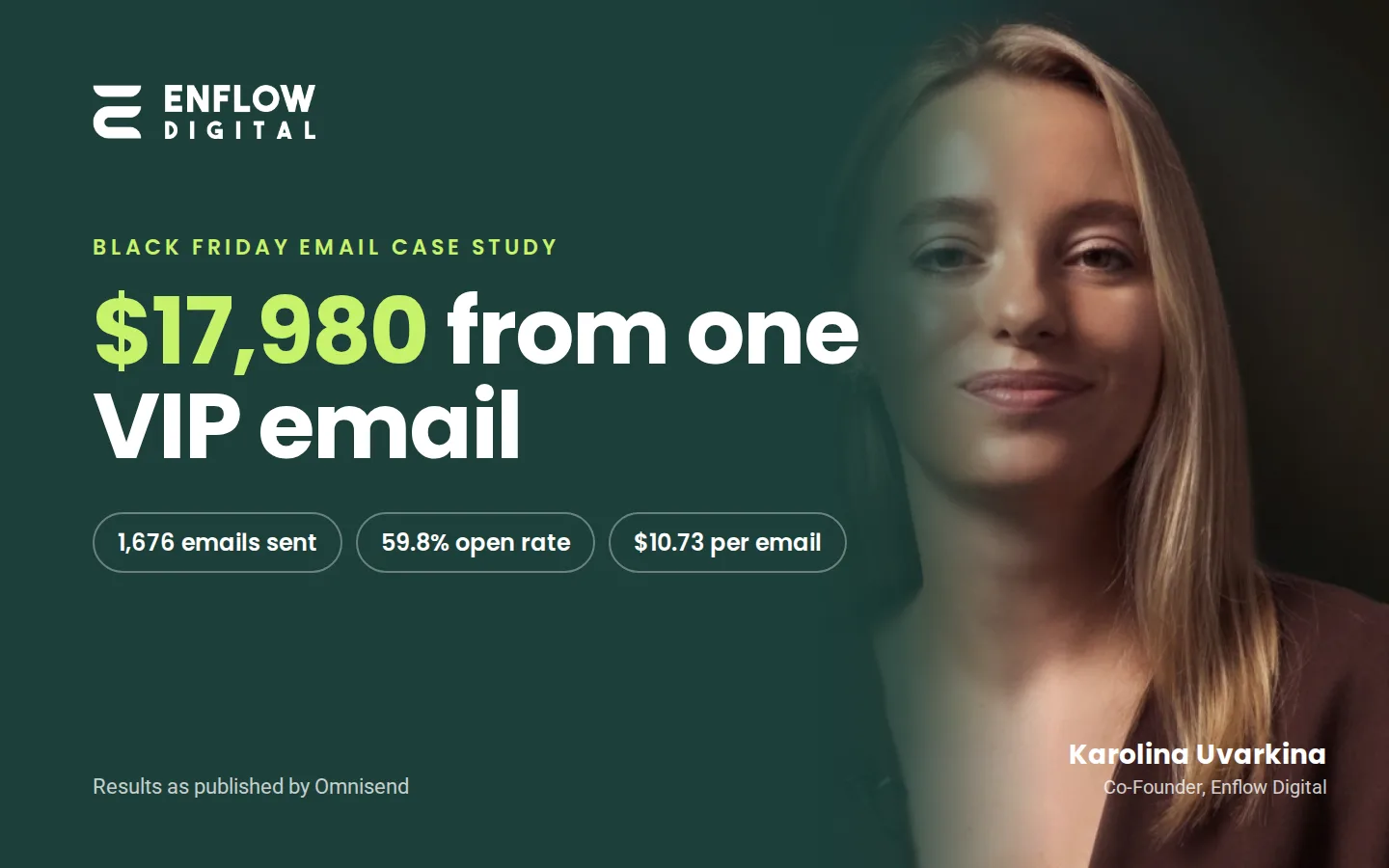
- A VIP stage email. One plain-text email went to 1,676 customers with at least four orders. Omnisend's VIP email story reports 110 orders and $17,980.66 in revenue, more than all of the previous month's broad campaigns combined. Our Black Friday case study explains how we wrote it.
Where SMS Fits in Lifecycle Marketing
SMS fits the lifecycle stages where a short, timely message helps: a cart reminder, a reorder reminder or an early-access alert for VIPs. Email carries the rest of the lifecycle. SMS needs its own opt-in, separate from email consent, and each text costs money, so use it where timing matters most.
Plan email and SMS on one calendar, so a customer does not get the same offer by text and by email on the same day. List every flow and campaign by stage and channel, with one owner for each. For the consent rules and how we run texts in Klaviyo and Omnisend, see our SMS marketing services.
Common Mistakes to Avoid in Lifecycle Email Marketing
The most common lifecycle email mistakes are sending too often, sending everyone the same email and stopping after the first order. Avoid these six:
- Over-emailing. Too many messages lead to unsubscribes and spam complaints.
- No segmentation. One email for every stage feels irrelevant to most of the people who get it.
- No testing. Without A/B tests you never learn which subject line, offer or timing works better.
- Stopping after the first sale. Many stores send nothing between the order confirmation and the next sale email, so the second order is left to chance.
- Two stage flows at once. A customer in a win-back flow and a VIP flow at the same time gets mixed messages. Use flow filters so each customer is in one stage flow at a time.
- Not measuring customer lifetime value (CLV). Without it, you cannot tell whether the flows bring customers back or only move orders that would have happened anyway.
Tips for Running Lifecycle Emails
Five habits make lifecycle email work at every stage. Segment by stage, automate the stage emails and measure each stage. Personalize with order data, and limit how often each customer hears from you.
Segment Your Audience
Segment your list by lifecycle stage: subscribers who never bought, first-time buyers, repeat buyers, VIPs and lapsed customers. Stage segments are built on order data, so they stay current without manual work. Our guide to email segmentation strategies covers more ways to split a list.
Automate Where Possible
Automate every email that answers a customer action: the welcome series, cart and browse reminders, post-purchase emails, replenishment reminders and win-back emails. Our guide to the 10 automated email flows every ecommerce store needs explains each flow.
Track & Measure Performance
Measure each stage by the result it should change, then check opens and clicks. Use these figures:
- Welcome: the share of new subscribers who place a first order.
- First purchase: orders recovered from abandoned carts.
- Post-purchase and repeat purchase: second orders, the repeat purchase rate and the time between the first and second order.
- VIP and loyalty: orders and revenue per VIP customer, and referrals.
- Win-back: lapsed customers who buy again, and the unsubscribe rate of the series.
Customer lifetime value ties the stages together.
Personalize Beyond First Names
Personalize with order data, not only a first name. Show products that go with the last order, mention the points balance and time the email to the product's life. The more an email matches what the customer did, the more useful it reads.
Limit How Often Each Customer Hears From You
Set a frequency limit across flows and campaigns. Klaviyo's Smart Sending setting limits how many messages one person gets in a set time, 16 hours for email and 24 hours for SMS by default (checked on 14 November 2026). Use flow filters too, so a customer who just bought leaves the cart and browse flows.
Advanced Trends in Ecommerce Lifecycle Marketing
Four newer tactics are worth testing once the core flows work. None of them replaces the six stages.
- Predicted next order dates. Where your platform predicts when each customer is likely to order again, use that date to time replenishment and win-back emails.
- Email and SMS on one plan. Each stage names the channel that goes first and the wait before the next one.
- Churn signals. A customer who stops opening, or passes their usual gap between orders, moves into win-back sooner.
- Interactive emails. Polls, quizzes and product pickers inside the email, where the email clients your customers use support them.
How to Get Started with Lifecycle Marketing for Your Ecommerce Brand
Start by writing down what a customer gets at each stage today, then build the missing flows closest to the first and second order. Five steps:
- List every live flow and campaign, and the stage each one serves.
- Find the empty stages. Post-purchase and repeat purchase are often empty.
- Build the welcome, abandoned cart and post-purchase flows first, if they are missing.
- Add replenishment, loyalty and win-back flows once enough customers have bought.
- Review the stage figures each month and change one thing at a time.
A small team can run this. A few flows, one stage segment per flow and a monthly review cover most of the work. To hand the work to a team, see our lifecycle marketing agency page, or get a free proposal for your store.
FAQs
What is lifecycle marketing?
Lifecycle marketing is a plan for what a brand sends each customer at each stage of the relationship, from the first visit to the win-back. For an ecommerce store, it covers the welcome, first purchase, post-purchase, repeat purchase, VIP and loyalty, and win-back stages, across email, SMS and other channels.
How is lifecycle marketing different from regular email marketing?
Lifecycle marketing sends each customer the message that fits their stage, while regular email marketing often sends one campaign to the whole list on a set date. Email is a channel. Lifecycle marketing is the plan behind it, and it can use SMS and other channels too. Most stores run both.
What are the stages of the customer lifecycle in ecommerce?
The ecommerce customer lifecycle has six stages: first visit and welcome, first purchase, post-purchase, repeat purchase, VIP and loyalty, and win-back. Each stage has its own goal, from the first order to the return of a lapsed customer, and its own emails. Some guides group them into a five-stage funnel instead.
What are examples of lifecycle emails?
Common lifecycle emails are the welcome series, the abandoned cart email and the post-purchase how-to email. Others are the review request, the replenishment reminder, the loyalty points reminder, the VIP early-access email and the win-back email. Each one is sent by a customer action or stage, not by a calendar date.
Can small eCommerce businesses benefit from lifecycle email marketing?
Yes. Small ecommerce businesses can start lifecycle email marketing with three automated flows: a welcome series, an abandoned cart email and a post-purchase email. These flows run on their own, so a small team only needs a monthly review. Add replenishment and win-back flows as the customer list grows.
How do you measure the success of lifecycle marketing campaigns?
Measure lifecycle marketing by the result each stage should change. Welcome emails should bring first orders, and post-purchase emails second orders and a higher repeat purchase rate. Win-back emails should bring lapsed customers back. Customer lifetime value (CLV) ties the stages together, and open and click rates show whether people read the emails.
What is a good customer retention rate for eCommerce?
A good customer retention rate depends on what you sell and how often people need it. Compare your store with its own past figures, not with a single industry number. Track the repeat purchase rate and the time between orders each month, and judge every lifecycle change by whether those figures improve.