Common Email Deliverability Issues and Their Solutions
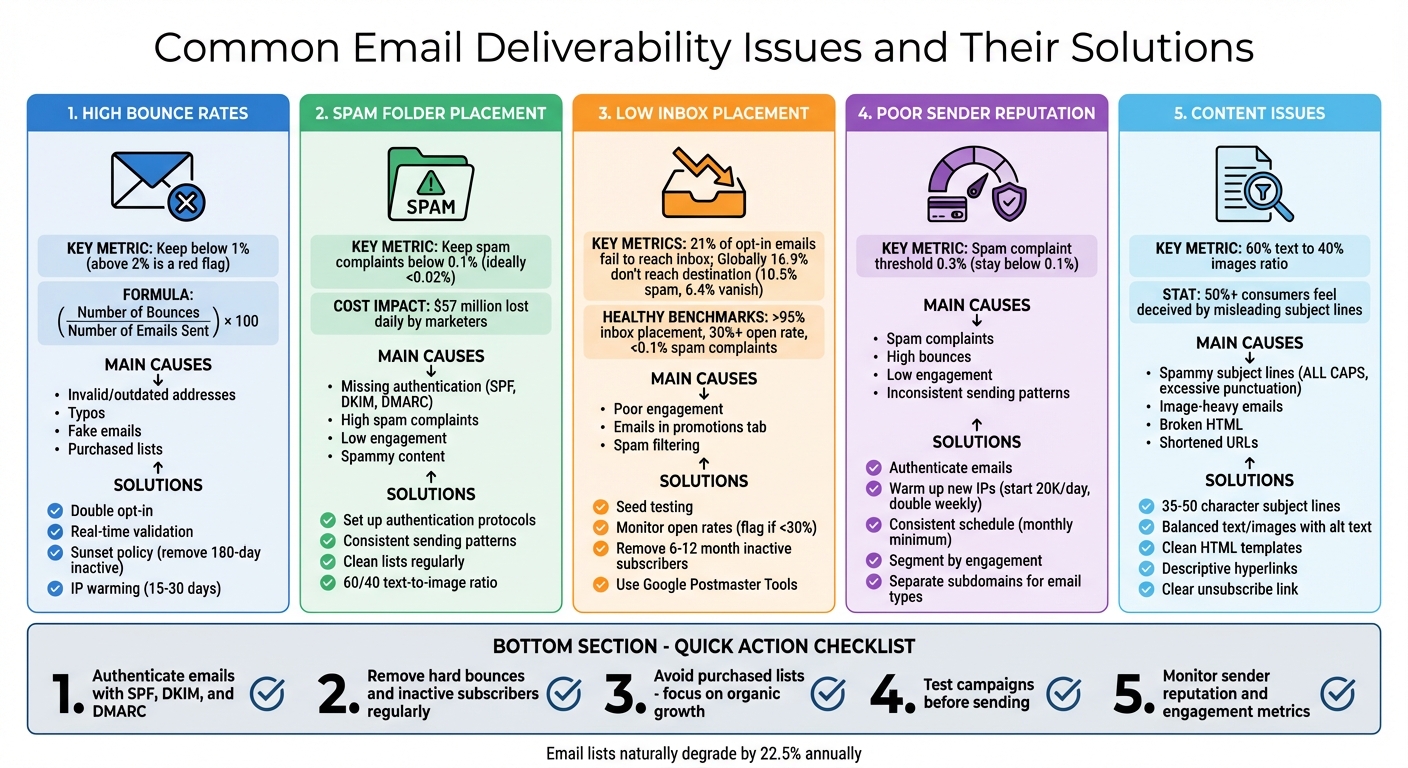
Email deliverability is about ensuring your emails land in your subscribers’ inboxes – not spam folders. For eCommerce businesses, poor deliverability can mean lost sales and damaged trust. Here’s a quick summary of key issues and solutions:
- High Bounce Rates: Caused by invalid or outdated email addresses. Fix this with double opt-in, real-time email validation, and regular list cleaning.
- Spam Folder Placement: Often due to missing authentication (SPF, DKIM, DMARC) or spammy content. Use proper authentication, clean lists, and balanced, clear content.
- Low Inbox Placement Rates: Engagement matters. Monitor metrics like open rates, use seed testing, and remove inactive subscribers.
- Sender Reputation: A poor reputation can block your emails. Maintain consistent sending patterns, segment by engagement, and monitor your reputation using tools like Google Postmaster Tools.
- Content Issues: Avoid spammy subject lines, overuse of images, and broken links. Stick to a 60/40 text-to-image ratio and use clean, professional templates.
Actionable Steps:
- Authenticate emails with SPF, DKIM, and DMARC.
- Remove hard bounces and inactive subscribers regularly.
- Avoid purchased email lists and focus on organic growth.
- Test your campaigns before sending to catch issues early.
- Monitor your sender reputation and engagement metrics.
Learning how to fix poor email deliverability takes consistent effort, but it ensures your emails reach the right audience, boosting engagement and conversions.
Email Deliverability Issues: Common Problems and Solutions Guide
Beginner’s Guide to Email Deliverability in 2026 (Ecommerce Email Marketing)
sbb-itb-0879168
High Bounce Rates: What Causes Them and How to Fix Them
A bounce happens when an email fails to reach its recipient. To calculate your bounce rate, use this formula: (Number of Bounces / Number of Emails Sent) × 100. Ideally, your bounce rate should stay below 1%. Anything above 2% is a red flag that could damage your sender reputation. For context, eCommerce campaigns often achieve a delivery rate of around 95%.
Bounces come in two flavors: hard bounces and soft bounces. Hard bounces are permanent failures, such as when an email address is invalid, doesn’t exist, or the recipient has blocked you. Soft bounces, on the other hand, are temporary issues – like a full inbox, a server outage, or an oversized email. Most email service providers will automatically remove hard bounces from your list. They also treat repeated soft bounces as hard bounces over time – Mailchimp, for example, does this after 15 attempts, while Klaviyo does it after 7. Understanding these distinctions is key to managing your deliverability.
A high bounce rate often signals poor email list hygiene or spam-like behavior, which can lead Internet Service Providers (ISPs) to filter or block your emails. Adding to the challenge, email lists naturally degrade by about 22.5% annually as people switch jobs or abandon old accounts.
What Causes High Bounce Rates
The most common culprit? Invalid or outdated email addresses. Typos during sign-up, fake addresses used to snag lead magnets, or aging records all contribute to this problem. Purchased or rented email lists make matters worse, as they often include spam traps and inactive addresses.
Technical issues also play a role. Misconfigured email authentication settings (like SPF, DKIM, or DMARC) or sending emails from blacklisted IP ranges can prevent your messages from being delivered. Additionally, sudden spikes in email volume can lead to soft bounces, as ISPs prefer steady and predictable sending patterns.
How to Reduce Bounce Rates
Tackling bounce rates requires a mix of smart list management and technical adjustments. Here are some strategies:
- Double opt-in: Require subscribers to confirm their email address during sign-up. While this may reduce sign-ups by 20%, it ensures your list is clean and filled with valid addresses, which helps lower bounce rates.
- Real-time email validation: Use tools to catch typos and disposable email addresses as users sign up.
- Sunset policy: Regularly remove subscribers who haven’t engaged with your emails for 180 days. This avoids sending emails to abandoned accounts.
- IP warming: If you’re using a new IP address, gradually increase your email volume over 15 to 30 days instead of sending to your entire list immediately.
"A lot of your email deliverability depends on how people are engaging with your email. Are they not opening? Are they bouncing? Are they marking it as spam? Or are they opening, clicking, reading, and engaging with your content?"
- Desirae Odjick, Product Marketing Lead, Shopify Messaging
Spam Folder Placement: How to Keep Emails Out of Spam
Landing in the spam folder is one of the biggest headaches for eCommerce businesses. It’s not just annoying – it’s costly. Marketers lose an estimated $57 million every day due to deliverability issues. Even emails with good intentions can get flagged because of technical missteps or content problems.
Here’s the silver lining: most spam placement issues are fixable. Unlike bounce rates, which can sometimes be out of your hands, spam folder placement often boils down to things you can control – like authentication, sender reputation, or the way your emails are written. Let’s break down why emails end up in spam and how to make sure yours don’t.
Why Emails End Up in Spam Folders
One of the main reasons emails land in spam is missing or incorrect authentication records. Without protocols like SPF, DKIM, and DMARC, mailbox providers can’t verify that you’re a legitimate sender. As Nick Schafer, Manager of Deliverability & Compliance at Mailgun, explains:
"Mailbox providers need ways to identify who a sender really is. Without email authentication, it’s hard to tell where email traffic is really coming from".
If mailbox providers can’t confirm your identity, they play it safe and send your emails straight to spam.
Another issue is high spam complaint rates. When recipients mark your email as spam, it sends a clear signal to mailbox providers that your emails might not be welcome. To protect your sender reputation, aim to keep spam complaints below 0.1%. While Gmail and Yahoo allow bulk senders to go up to 0.3%, most well-managed campaigns stay under 0.02% .
Low engagement rates are another red flag. Providers like Gmail track how recipients interact with your emails. If people rarely open them, delete them without reading, or don’t click on your links, it signals that your content isn’t relevant. Irek Rybinski, Deliverability Engineer at GetResponse, notes:
"For the last few years I’ve seen ISPs pay more and more attention to the engagement metrics, so even if you have low negative factors… but your engagement is very low too, they will still see you as a spammer".
Content triggers can also trip up spam filters. Misleading subject lines, for instance, confuse over 50% of consumers. Words like "Free", "Act Now", or "Winner" can raise red flags, as can emails with too many images and not enough text. Spam filters generally prefer emails with at least a 60% text to 40% images ratio.
Finally, poor list hygiene can lead to trouble. Using purchased email lists or failing to remove inactive subscribers increases the risk of hitting spam traps – decoy addresses used by ISPs to catch senders with questionable practices. These traps can severely harm your deliverability .
How to Improve Inbox Placement
To keep your emails out of spam, start by setting up proper authentication protocols. Configure SPF, DKIM, and DMARC in your DNS settings to verify your identity and build trust with mailbox providers . If you’re sending bulk emails (5,000+ per day), these protocols are a must for Gmail, Yahoo, and Outlook. Once your DMARC record is active, consider moving from p=none (monitoring only) to p=quarantine or p=reject for stronger protection .
Keep your sending patterns consistent and warm up new IP addresses gradually. Sudden spikes in email volume can look suspicious to spam filters. If you’re using a new IP, start small and gradually increase your volume over 15 to 30 days to establish a positive reputation .
Regularly clean your email list to maintain high engagement. Remove subscribers who haven’t opened an email in 3 to 6 months, and use double opt-in to ensure new sign-ups are valid and genuinely interested . Signing up for feedback loops (FBLs) with ISPs can also help you spot and remove people who mark your emails as spam .
Optimize your email content to avoid triggering spam filters. Stick to a balanced text-to-image ratio (at least 60% text). Use descriptive link text instead of raw URLs, and avoid sending emails that are just clickable links. As Irek Rybinski advises:
"The text to link ratio needs to be reliable and relatable – providing good content value to your contacts. Sending them only clickable links is usually not one of them".
Finally, monitor your reputation using tools like Google Postmaster Tools and Microsoft SNDS. These platforms give you insights into your domain reputation, spam rates, and authentication status, helping you catch issues before they escalate .
| Action | Impact on Inbox Placement | Timeframe |
|---|---|---|
| Set up SPF, DKIM, DMARC | Verifies sender identity; prevents spoofing | Immediate (24–48 hours) |
| Implement double opt-in | Ensures valid, engaged subscribers | Ongoing for new sign-ups |
| Remove inactive subscribers | Improves engagement metrics | Monthly or quarterly |
| Warm up new IP addresses | Builds positive reputation gradually | 15–30 days |
| Monitor Google Postmaster Tools | Identifies reputation issues early | Weekly checks recommended |
| Maintain 60/40 text-to-image ratio | Avoids content-based spam triggers | Every campaign |
Low Inbox Placement Rates: How to Diagnose and Fix Them
Inbox placement rate measures the percentage of emails that actually land in the primary inbox, not just the delivery rate – which only confirms the receiving server accepted your email. As Mike Arsenault, Founder & CEO of Rejoiner, explains:
"A delivered email could end up in the recipient’s inbox, the spam folder, or get blocked. So the email delivered rate doesn’t tell the entire story."
Low inbox placement can quietly sabotage eCommerce campaigns. Emails might technically be delivered, but if they’re flagged as spam or blocked altogether, you’re losing out on potential sales. For instance, 21% of opt-in emails fail to reach the inbox. Globally, 16.9% of emails don’t make it to their intended destination – 10.5% land in spam, and 6.4% vanish entirely. Even Google, with a 95.54% delivery rate, sees only 57.8% of emails hitting the primary inbox, while 37.74% end up in the promotions tab.
How to Identify Low Inbox Placement Rates
A sudden drop in open rates is often the first clue of low inbox placement. If your open rate dips below 30% or your click-through rate falls under 1%, something’s likely wrong. Keep in mind, even a high delivery rate (like 98%) doesn’t guarantee your emails are reaching the inbox – they might be sitting in spam folders instead.
To pinpoint placement issues, start with seed list testing. Create a small test group of email addresses across providers like Gmail, Yahoo, and Outlook, and send your campaign there first. Check where the emails land – inbox, spam, or promotions. If they consistently end up in spam during these tests, you’ve uncovered a problem before it impacts your full campaign.
Other warning signs include a drop in the click-to-open rate (even if total clicks remain steady), which might mean recipients aren’t seeing your emails because they’re in spam. Also, pay attention to customer complaints about “missing” emails, such as password resets or order confirmations – these can indicate placement issues before your analytics catch up.
To dig deeper, tools like Google Postmaster Tools and Microsoft SNDS can help monitor your domain and IP reputation. These resources show if your sender reputation is declining or if spam complaints are on the rise. Additionally, use tools like MXtoolbox to check if your domain or IP has been blacklisted by major blocklists like Spamhaus.
| Metric | Healthy Benchmark | Sign of Trouble |
|---|---|---|
| Inbox Placement Rate | >95% | <80% |
| Open Rate | 30% or higher | Below 20% |
| Spam Complaint Rate | <0.1% (ideally <0.02%) | >0.1% |
| Bounce Rate | <1% | >2% |
| Delivery Rate | 95% or higher | <90% |
Once you identify the problem, focus on tweaking specific areas to improve placement.
How to Improve Inbox Placement Rates
To improve inbox placement, address key areas like sender details, content quality, list hygiene, and email volume management.
Start by refining your sender details. Use a consistent and recognizable sender name, and avoid no-reply addresses. Make sure to authenticate your sender domain to establish your identity with email providers.
Next, craft subject lines that are clear, relevant, and accurately reflect the email’s content. Misleading subject lines can confuse recipients and trigger spam filters. Keep them concise and test different approaches with A/B testing to see what works best for your audience.
Maintain list hygiene by regularly removing hard bounces and inactive subscribers (those who haven’t engaged in 6–12 months) to protect your sender reputation.
If you’re using new IP addresses or domains, warm them up gradually. Start by sending around 20,000 emails per day and increase the volume slowly to build trust with ISPs. Sudden spikes in activity from a new sender can raise red flags and lead to filtering.
Finally, include an easy, one-click unsubscribe option in your emails. This is a requirement for bulk senders using services like Google, Yahoo, and Outlook. Not only does it comply with regulations, but it also reduces spam complaints, which can harm your sender reputation.
How to Build and Maintain a Strong Sender Reputation
Your sender reputation is like an email "credit score." It’s a measure assigned by mailbox providers such as Gmail, Yahoo, and Outlook, based on your IP address and domain history. A strong reputation ensures your emails land in inboxes, while a poor one can lead to throttling, spam folder placement, or even outright blocking.
Mailbox providers keep a close eye on everything: how recipients interact with your emails (opens, clicks, replies), how often you’re marked as spam, your bounce rates, and whether your emails are properly authenticated with SPF, DKIM, and DMARC protocols. Tim Kauble, Senior Director of Deliverability & Compliance Operations at Salesforce, explains it well:
"A conversion comes after a click, a click comes after an open, an open comes after delivery. If you focus on optimizing for delivery, you inherently maximize your opportunities for ROI."
It’s also important to note the growing emphasis on domain-based reputation. Unlike IP addresses, your domain’s history sticks with you, even if you switch email service providers. Knowing what can harm your reputation is key to maintaining it.
What Can Harm Your Sender Reputation
Spam complaints are one of the biggest threats. Gmail and Yahoo have set a spam complaint threshold of 0.3%, but staying below 0.1% (1 complaint per 1,000 emails) is ideal. These rates are calculated based on emails that actually reach inboxes, so even a small number of complaints can have a big impact.
High bounce rates are another red flag. They often indicate poor list management or the use of purchased or scraped email lists. To avoid this, keep bounce rates under 1%. Hard bounces, which occur when an address is invalid, should be removed immediately since they harm your reputation with every attempt to send.
Low engagement rates can create a snowball effect. If subscribers ignore your emails – deleting them without opening or never clicking – mailbox providers may assume your content is unwanted. This leads to fewer emails reaching inboxes, which in turn lowers engagement even further.
Inconsistent sending patterns can also raise suspicion. Sudden spikes in email volume or long gaps between sends may trigger filters, especially if you’re using a new IP or domain. Mailbox providers prefer predictable behavior, such as steady sending volumes and consistent email designs.
How to Build and Protect Your Sender Reputation
To safeguard your sender reputation, follow these proven strategies:
- Authenticate your emails. Use SPF, DKIM, and DMARC protocols. Gradually move from a p=none DMARC policy to p=quarantine or p=reject to secure your domain and build trust with mailbox providers.
- Warm up new IP addresses. Start small – send 20,000 emails per day to your most engaged subscribers and double the volume weekly over 3–4 weeks.
- Stick to a consistent sending schedule. Aim to email your active subscribers at least once a month, but avoid over-sending, as daily emails can lead to unsubscribes. Regularity helps mailbox providers recognize your emails as legitimate.
- Segment your audience by engagement. Focus on sending emails to subscribers who have interacted with your content recently. For those who haven’t engaged in 6–12 months, consider a sunset policy to stop emailing them.
- Use separate subdomains for different email types. For example, send marketing emails from
marketing.brand.comand transactional emails fromtransactional.brand.com. This way, any issues with one type won’t affect the other. - Make unsubscribing simple. Include a clear, one-click unsubscribe link. If subscribers struggle to opt out, they’re more likely to mark your emails as spam, which directly harms your reputation.
- Monitor your reputation. Use tools like Google Postmaster Tools and Microsoft SNDS to track how mailbox providers view your domain and IP. These tools can alert you to issues before they become major problems.
List Quality: How to Build and Maintain a Healthy Email List
The quality of your email list plays a huge role in whether your emails land in inboxes or get flagged as spam. A clean, engaged list earns trust with mailbox providers, while a bloated or poorly maintained list can seriously hurt your sender reputation. Carin Slater, Manager of Lifecycle Email Marketing at Litmus, puts it perfectly:
"It’s much better to have a smaller, highly engaged email list than a larger one full of random email addresses for deliverability."
In short, keeping your list clean is just as important as managing bounce rates or maintaining a good sender reputation. Below, we’ll break down common problems and practical steps to improve your email list quality.
Common Email List Quality Problems
Purchased or scraped lists are one of the fastest ways to ruin your deliverability. These lists are often riddled with spam traps – email addresses set up by ISPs to catch bad senders. Hitting one of these traps can get you blacklisted instantly. Plus, these lists usually include people who never opted in, leading to high spam complaints and low engagement.
Spam traps come in three main types:
- Pristine traps: Addresses that never belonged to a real person.
- Recycled traps: Old, abandoned accounts repurposed as traps.
- Typo traps: Common misspellings like @gamil.com instead of @gmail.com.
Each type signals to mailbox providers that your list needs better maintenance.
High bounce rates are another major warning sign. A bounce rate over 2% signals trouble, and anything above 10% needs immediate attention. Hard bounces – caused by invalid or non-existent addresses – are especially damaging since repeated attempts to send to these addresses hurt your reputation. Keep in mind, email lists naturally degrade by about 22% each year, as people change jobs or abandon accounts.
Unengaged subscribers – those who haven’t opened or clicked an email in 6 to 12 months – can also hurt your deliverability. Internet Service Providers (ISPs) may interpret this as a sign that your emails aren’t relevant. Milena Baghdasaryan, Content Specialist at PowerDMARC, warns:
"Poor email hygiene can destroy your email deliverability."
Technical errors like invalid addresses from bot signups, syntax mistakes, or disposable emails also signal poor verification processes at signup. Role-based emails (like info@ or support@) are another challenge, as they’re typically managed by multiple people who may not have agreed to receive emails.
Addressing these issues is essential to maintaining a high-quality email list. Here’s how you can tackle them effectively.
How to Maintain a Clean Email List
To keep your email list in top shape, start with double opt-in and real-time email validation. Double opt-in requires subscribers to confirm their email address and interest, ensuring your list is filled with engaged users. While this process might reduce signups by about 30%, it can increase engagement rates by as much as 40%.
Establish a sunset policy to automatically remove subscribers who haven’t engaged in 90 to 180 days. Before you cut them loose, try a re-engagement campaign to win them back. If they remain inactive, it’s time to let them go.
Suppress hard bounces immediately and run monthly audits to monitor bounce rates, check for blacklists, and remove inactive contacts. Don’t forget to process unsubscribes within 10 days to stay compliant with CAN-SPAM regulations.
Avoid buying, renting, or using third-party lists at all costs. Organic list growth may take longer, but it’s the only way to build a reliable base of engaged subscribers who actually want your content. You can also offer a preference center, allowing subscribers to manage their email frequency and topics instead of unsubscribing altogether.
| Sign of Poor List Quality | Impact on Deliverability | Recommended Action |
|---|---|---|
| Purchased Lists | High spam traps, blacklisting | Stick to organic list-building methods |
| High Hard Bounces | Damaged sender reputation | Use real-time validation tools |
| Inactive Subscribers | Signals low engagement to ISPs | Set up a sunset policy or re-engagement campaigns |
| Spam Traps | Immediate blacklisting | Regularly clean your list and use double opt-in |
| Typos/Syntax Errors | Increased bounce rates | Use double-entry fields or validation APIs |
| Disposable Emails | Temporary engagement, future bounces | Block burner domains during signup |
Content Optimization: How to Avoid Spam Filters
When it comes to email deliverability, the content of your email plays a major role in whether it lands in the inbox or gets flagged as spam. Even with a strong sender reputation and a well-maintained email list, poorly crafted content can still trigger spam filters. These filters analyze elements like headers, footers, images, and even text colors. If certain patterns match their criteria, your email could be flagged as spam. By paying attention to design and copy, you can avoid these pitfalls.
Let’s look at some common content issues that spam filters target.
Common Content Problems That Trigger Spam Filters
Spammy subject lines are one of the quickest ways to set off spam filters. Overuse of ALL CAPS, excessive punctuation, or misleading prefixes can cause problems – and they also tend to annoy readers. Studies show that more than 50% of consumers feel deceived by such tactics. Words like "Free", "Guarantee", "Earn money fast", "Risk-free", and "Order now" are particularly problematic and should be avoided in both subject lines and body text.
Poorly written HTML code is another red flag. Filters look for things like empty tags, unclosed tags, missing MIME sections, and obscure fonts. Sloppy HTML suggests low-quality or even malicious intent, which can get your email blocked.
Image-heavy emails are also risky. Spammers often use image-only emails to bypass filters that scan for suspicious words. As a result, emails with little to no text and an overreliance on images are often flagged. A good rule of thumb is to aim for a 60/40 text-to-image ratio. This ensures your message remains readable even if images are blocked. Adding alt text for images is another way to improve clarity.
Link integrity matters too. Spam filters are wary of links that use IP addresses, shorteners like bit.ly, or mismatched URLs where the hyperlink text doesn’t match the destination. Additionally, leaving out a plain-text version of your email can trigger filters that expect a multi-part MIME format.
Here’s a quick summary of common issues and how to fix them:
| Content Element | Spam Trigger Risk | Recommended Solution |
|---|---|---|
| Subject Line | ALL CAPS / Excessive Punctuation | Use sentence case; keep it between 35–50 characters |
| Images | Image-only emails | Stick to a 60% text and 40% image balance |
| Links | Shortened or mismatched URLs | Use branded URLs or descriptive text |
| Formatting | Broken HTML or missing tags | Use professional templates and validate your code |
| Attachments | Large or executable files | Host files on a secure server and include a link |
How to Improve Email Content
Fine-tuning your email content can help you avoid spam filters and improve engagement.
Craft better subject lines. Keep them concise – between 35 and 50 characters – use sentence case, and avoid over-the-top punctuation or spammy words. For instance, instead of "URGENT: FREE OFFER!!!", try something more neutral like "Your weekly update is here".
Balance text and images. Stick to a 60/40 text-to-image ratio, and always include alt text for images to ensure your message is clear, even if images don’t load.
Clean up your HTML. Use professional templates and double-check your code for errors like unclosed tags or missing MIME sections. Also, include a plain-text version of your email to make it accessible and legitimate in the eyes of spam filters.
Use descriptive hyperlinks instead of raw URLs or shorteners. For example, instead of linking "www.site.com" or "bit.ly/xyz", use phrases like "View our latest collection." This not only avoids filter triggers but also makes your email more reader-friendly.
Irek Rybinski, Deliverability Engineer at GetResponse, highlights the importance of balance:
"The text to link ratio needs to be reliable and relatable – providing good content value to your contacts. Sending them only clickable links is usually not one of them."
Test before sending. Run A/B tests on a small segment of your email list to see how different subject lines, templates, and content perform. This can help you identify what works best for deliverability and engagement. And don’t forget to include a clear unsubscribe link – this isn’t just a requirement under the CAN-SPAM Act, but it also reduces the chances of recipients marking your email as spam.
Conclusion: How to Ensure Reliable Email Deliverability
Ensuring reliable email deliverability isn’t a one-time task – it demands continuous effort in areas like authentication, list quality, sender reputation, and content optimization. Did you know that about 21% of opt-in emails never make it to the inbox, and 45.6% of all emails end up in spam folders?. For eCommerce businesses, these numbers represent missed opportunities and revenue losses.
To improve deliverability, focus on proactive strategies. Start with proper authentication protocols like SPF, DKIM, and DMARC to verify your emails. Keep your email list clean by using double opt-in methods and regularly removing inactive or invalid addresses. Monitoring engagement metrics like open rates and complaints is also crucial to maintaining a strong sender reputation and minimizing bounces.
But it’s not just about the technical side. The content of your emails plays a big part in determining whether they land in the inbox or the spam folder. Use a mix of text and visuals, steer clear of spam-trigger words in your subject lines, and always include a clear option to unsubscribe. As Desislava Zhivkova, CustOps Deliverability Team Lead at Omnisend, explains:
"Mastering authentication is crucial for email marketing success. If email deliverability feels overwhelming, experts can guide you through the process to ensure optimal results".
Case studies underline the importance of addressing issues like authentication, list hygiene, and sender reputation, often showing notable improvements in open rates and revenue.
To further enhance your results, leverage tools like Google Postmaster Tools to track performance, segment your audience based on engagement, and gradually warm up new IPs or domains over 15–30 days. By prioritizing deliverability, you’ll not only improve engagement but also drive higher conversions and revenue.
FAQs
What steps can I take to improve my email sender reputation?
To improve your email sender reputation, begin by implementing SPF, DKIM, and DMARC protocols. These authentication tools ensure your emails are verified and less likely to be flagged as spam. Keep your email list updated by removing invalid or inactive addresses, and focus on reaching recipients who interact with your content. Pay attention to metrics like open rates and click-through rates to gauge engagement and minimize spam complaints. Consistently delivering high-quality, relevant emails builds trust with both your audience and email providers.
How can I effectively reduce email bounce rates?
To keep your email bounce rates low, it’s crucial to start with accurate and verified email addresses. During sign-up, implement a double opt-in process – this ensures that the email addresses provided are valid and belong to actual users.
Another key step is to regularly clean up your email list. Remove any invalid, outdated, or hard-bounce addresses to maintain a high-quality list. This not only improves deliverability but also helps protect your sender reputation.
Finally, keep a close eye on your email campaigns. Monitoring performance can help you spot issues or patterns early, giving you the chance to address them before they escalate.
Taking these actions will help ensure your emails land where they’re meant to: in your audience’s inbox.
How can I prevent my emails from going to spam?
To ensure your emails stay out of spam folders, start by adopting a double opt-in process. This confirms that recipients genuinely want to receive your messages. Regularly tidy up your email list by removing invalid addresses and hard bounces to maintain its quality. Use email authentication protocols like SPF, DKIM, and DMARC to verify your emails and establish credibility. Steer clear of spam-triggering words or overly promotional language – focus instead on delivering valuable, engaging content. Lastly, keep an eye on your sender reputation and promptly address any spam complaints to maintain a good standing with email providers.